We provide real SPLK-1002 exam questions and answers braindumps in two formats. Download PDF & Practice Tests. Pass Splunk SPLK-1002 Exam quickly & easily. The SPLK-1002 PDF type is available for reading and printing. You can print more and practice many times. With the help of our Splunk SPLK-1002 dumps pdf and vce product and material, you can easily pass the SPLK-1002 exam.
Free SPLK-1002 Demo Online For Splunk Certifitcation:
NEW QUESTION 1
Which of the following statements describe the search below? (select all that apply) Index=main I transaction clientip host maxspan=30s maxpause=5s
- A. Events in the transaction occurred within 5 seconds.
- B. It groups events that share the same clientip and host.
- C. The first and last events are no more than 5 seconds apart.
- D. The first and last events are no more than 30 seconds apart.
Answer: ABD
Explanation:
The search below groups events by two or more fields (clientip and host), creates transactions with start and end constraints (maxspan=30s and maxpause=5s), and calculates the duration of each transaction.
index=main | transaction clientip host maxspan=30s maxpause=5s The search does the following: It filters the events by the index main, which is a default index in Splunk that contains all data that is not sent to other indexes. It uses the transaction command to group events into transactions based on two fields: clientip and host.
The transaction command creates new events from groups of events that share the same clientip and host values. It specifies the start and end constraints for the transactions using the maxspan and maxpause arguments. The maxspan argument sets the maximum time span between the first and last events in a transaction. The maxpause argument sets the maximum time span between any two consecutive events in a transaction. In this case, the maxspan is 30 seconds and the maxpause is 5 seconds, meaning that any transaction that has a longer time span or pause will be split into multiple transactions. It creates some additional fields for each transaction, such as duration, eventcount, startime, etc. The
duration field shows the time span between the first and last events in a transaction.
NEW QUESTION 2
Which one of the following statements about the search command is true?
- A. It does not allow the use of wildcards.
- B. It treats field values in a case-sensitive manner.
- C. It can only be used at the beginning of the search pipeline.
- D. It behaves exactly like search strings before the first pipe.
Answer: D
Explanation:
Reference: https://docs.splunk.com/Documentation/SplunkCloud/8.0.2003/Search/Usethesearchcommand The search command is used to filter or refine your search results based on a search string that matches the events2. The search command behaves exactly like search strings before the first pipe, which means that you can use the same syntax and operators as you would use in the initial part of your search2. Therefore, option D is correct, while options A, B and C are incorrect because they are not true statements about the search command.
NEW QUESTION 3
Which tool uses data models to generate reports and dashboard panels without using SPL?
- A. Visualization tab
- B. Pivot
- C. Datasets
- D. splunk CIM
Answer: B
Explanation:
The correct answer is B. Pivot1.
In Splunk, Pivot is a tool that uses data models to generate reports and dashboard panels without the need for users to write or understand Splunk’s Search Processing Language (SPL)1. Data models enable users of Pivot to create compelling reports and dashboards1. When a Pivot user designs a pivot report, they select the data model that represents the category of event data that they want to work with1. Then they select a dataset within that data model that represents the specific dataset on which they want to report1. This makes Pivot a powerful tool for users who need to create visualizations but do not have a deep understanding of SPL1.
NEW QUESTION 4
Selected fields are displayed _______ each event in the search results.
- A. below
- B. interesting fields
- C. other fields
- D. above
Answer: A
Explanation:
Selected fields are fields that you choose to display in your search results by clicking on them in the Fields sidebar or by using the fields command2. Selected fields are displayed below each event in the search results, along with their values2. Therefore, option A is correct, while options B, C and D are incorrect because they are not places where selected fields are displayed.
NEW QUESTION 5
Which of the following is true about Pivot?
- A. Users can save reports from Pivot.
- B. Users cannot share visualizations created with Pivot.
- C. Users must use SPL to find events in a Pivot.
- D. Users cannot create visualizations with Pivot.
Answer: A
Explanation:
In Splunk, Pivot is a tool that allows you to report on a specific data set without using the Splunk Search Processing Language (SPL™)1. You can use a drag-and-drop interface to design and generate pivots that present different aspects of your data in the form of tables, charts, and other visualizations12.
One of the features of Pivot is that it allows you to save your reports1. This can be useful when you want to reuse a report or share it with others1. Therefore, it’s not true that users cannot share visualizations created with Pivot or that they must use SPL to find events in a Pivot12. It’s also not true that users cannot create visualizations with Pivot, as creating visualizations is one of the main functions of Pivot12.
NEW QUESTION 6
Which delimiters can the Field Extractor (FX) detect? (select all that apply)
- A. Tabs
- B. Pipes
- C. Spaces
- D. Commas
Answer: BCD
Explanation:
Reference: https://docs.splunk.com/Documentation/Splunk/8.0.3/Knowledge/FXSelectMethodstep
The Field Extractor (FX) is a tool that helps you extract fields from your data using delimiters or regular expressions. Delimiters are characters or strings that separate fields in your data. The FX can detect some common delimiters automatically, such as pipes (|), spaces ( ), commas (,), semicolons (;), etc. The FX cannot detect tabs (\t) as delimiters automatically, but you can specify them manually in the FX interface.
NEW QUESTION 7
When using | timchart by host, which filed is representted in the x-axis?
- A. date
- B. host
- C. time
- D. -time
Answer: A
NEW QUESTION 8
The time range specified for a historical search defines the _________.------questionable on ans
- A. Amount of data shown on the timeline as data streams in
- B. Amount of data fetched from index matching that time range
- C. Time range for the static results
Answer: B
Explanation:
The time range specified for a historical search defines the amount of data fetched from the index matching that time range2. A historical search is a search that runs over a fixed period of time in the past2. When you run a historical search, Splunk searches the index for events that match your search string and fall within the specified time range2. Therefore, option B is correct, while options A and C are incorrect because they are not what the time range defines for a historical search.
NEW QUESTION 9
A user runs the following search:
index—X sourcetype=Y I chart count (domain) as count, sum (price) as sum by product, action usenull=f useother—f
Which of the following table headers match the order this command creates?
- A. The chart command does not allow for multiple statistical functions.
- B. Product, sum: addtocart, sum: remove, sum: purchase, count: addtocart, count: remove, count: purchase
- C. Product, count: addtocart, count: remove, count: purchase, sum: addtocart, sum: remove, sum: purchase
- D. Count: product, sum: product, count: action, sum: action
Answer: C
Explanation:
The correct answer is C. Product, count: addtocart, count: remove, count: purchase, sum: addtocart, sum: remove, sum: purchase1.
In Splunk, the chart command is used to create a table or a chart visualization from your data2. The chart command takes at least one function and one field, and optionally another field to group by2.
In the given search, the chart command is used with two functions (count and sum), two fields (domain and price), and two fields to group by (product and action). The usenull=f and useother=f options are used to exclude null values and other values from the chart2.
The chart command creates a table with headers that match the order of the fields and functions in the command1. The headers for the count function are prefixed with count:, and the headers for the sum function are prefixed with sum:1. The values of the product and action fields are used as the suffixes for the headers1.
Therefore, the table headers created by this command are Product, count: addtocart, count: remove, count: purchase, sum: addtocart, sum: remove, and sum: purchase1.
NEW QUESTION 10
What other syntax will produce exactly the same results as | chart count over vendor_action by user?
- A. | chart count by vendor_action, user
- B. | chart count over vendor_action, user
- C. | chart count by vendor_action over user
- D. | chart count over user by vendor_action
Answer: A
Explanation:
https://docs.splunk.com/Documentation/Splunk/8.1.2/SearchReference/Chart
NEW QUESTION 11
We can use the rename command to ________ (Select all that apply.)
- A. Change indexed fields
- B. Exclude fields from our search results
- C. Extract new fields from our data using regular expressions
- D. Give a field a new name at search time
Answer: D
NEW QUESTION 12
For the following search, which field populates the x-axis? index=security sourcetype=linux secure | timechart count by action
- A. action
- B. source type
- C. _time
- D. time
Answer: C
Explanation:
The correct answer is C. _time.
The timechart command creates a time series chart with corresponding table of statistics, with time used as the X-axis1. You can specify a split-by field, where each distinct value of the split-by field becomes a series in the chart1. In this case, the split-by field is action, which means that the chart will have different lines for different actions, such as accept, reject, or fail2. The count function will calculate the number of events for each action in each time bin1.
For example, the following image shows a timechart of the count by action for a similar search3:
As you can see, the x-axis is populated by the _time field, which represents the time range of the search. The y-axis is populated by the count function, which represents the number of events for each action. The legend shows the different values of the action field, which are used to split the chart into different series.
Reference:
2: Timechart Command In Splunk With Example - Mindmajix 1: timechart - Splunk Documentation 3: timechart command examples - Splunk Documentation
NEW QUESTION 13
Which of the following is included with the Common Information Model (CIM) add-on?
- A. Search macros
- B. Event category tags
- C. Workflow actions
- D. tsidx files
Answer: B
Explanation:
The correct answer is B. Event category tags. This is because the CIM add-on contains a collection of preconfigured data models that you can apply to your data at search time. Each data model in the CIM consists of a set of field names and tags that define the least common denominator of a domain of interest. Event category tags are used to classify events into high-level categories, such as authentication, network traffic, or web activity. You can use these tags to filter and analyze events based on their category. You can learn more about event category tags from the Splunk documentation12. The other options are incorrect because they are not included with the CIM add-on. Search macros are reusable pieces of search syntax that you can invoke from other searches. They are not specific to the CIM add-on, although some Splunk apps may provide their own search macros. Workflow actions are custom links or scripts that you can run on specific fields or events. They are also not specific to the CIM add-on, although some Splunk apps may provide their own workflow actions. tsidx files are index files that store the terms and pointers to the raw data in Splunk buckets. They are part of the Splunk indexing process and have nothing to do with the CIM add-on.
NEW QUESTION 14
If there are fields in the data with values that are " " or empty but not null, which of the following would add a value?
- A. | eval notNULL = if(isnull (notNULL), “0” notNULL)
- B. | eval notNULL = if(isnull (notNULL), “0”
- C. | eval notNULL = “” | nullfill value=0 notNULL
- D. | eval notNULL = “” fillnull value=0 notNULL
Answer: D
Explanation:
The correct answer is D. | eval notNULL = “” fillnull value=0 notNULL Option A is incorrect because it is missing a comma between the “0” and the notNULL in the if function. The correct syntax for the if function is if (condition, true_value, false_value). Option B is incorrect because it is missing the false_value argument in the if function. The correct syntax for the if function is if (condition, true_value, false_value). Option C is incorrect because it uses the nullfill command, which only replaces null values, not empty strings. The nullfill command is equivalent to fillnull value=null. Option D is correct because it uses the eval command to assign an empty string to the notNULL field, and then uses the fillnull command to replace the empty string with a zero. The fillnull command can replace any value with a specified replacement, not just null values.
NEW QUESTION 15
Which of the following searches would return a report of sales by product-name?
- A. chart sales by product_name
- B. chart sum(price) as sales by product_name
- C. stats sum(price) as sales over product_name
- D. timechart list(sales), values(product_name)
Answer: B
Explanation:
https://docs.splunk.com/Documentation/Splunk/8.1.0/SearchReference/Chart https://docs.splunk.com/Documentation/Splunk/8.1.0/SearchReference/Stats
NEW QUESTION 16
Given the macro definition below, what should be entered into the Name and Arguments fileds to correctly configured the macro?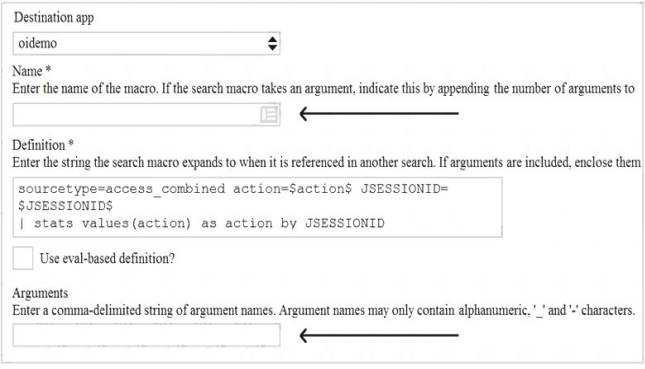
- A. The macro name is sessiontracker and the arguments are action, JESSIONID.
- B. The macro name is sessiontracker(2) and the arguments are action, JESSIONID.
- C. The macro name is sessiontracker and the arguments are $action$, $JESSIONID$.
- D. The macro name is sessiontracker(2) and the Arguments are $action$, $JESSIONID$.
Answer: B
Explanation:
Reference: https://docs.splunk.com/Documentation/Splunk/8.0.3/Knowledge/Definesearchmacros
The macro definition below shows a macro that tracks user sessions based on two arguments: action and JSESSIONID.
sessiontracker(2)
The macro definition does the following:
It specifies the name of the macro as sessiontracker. This is the name that will be used to execute the macro in a search string.
It specifies the number of arguments for the macro as 2. This indicates that the macro takes two arguments when it is executed.
It specifies the code for the macro as index=main sourcetype=access_combined_wcookie action=$action$ JSESSIONID=$JSESSIONID$ | stats count by JSESSIONID. This is the search string that will be run when the macro is executed. The search string can contain any part of a search, such as search terms, commands, arguments, etc. The search string can also include variables for the arguments using dollar signs around them. In this case, action and JSESSIONID are variables for the arguments that will be replaced by their values when the macro is executed.
Therefore, to correctly configure the macro, you should enter sessiontracker as the name and action, JSESSIONID as the arguments. Alternatively, you can use sessiontracker(2) as the name and leave the arguments blank.
NEW QUESTION 17
Which of the following eval command function is valid?
- A. Int ()
- B. Count ( )
- C. Print ()
- D. Tostring ()
Answer: D
Explanation:
The eval command supports a number of functions that you can use in your expressions to perform calculations, conversions, string manipulations and more2. One of the eval command functions is tostring(), which converts a numeric value to a string value2. Therefore, option D is correct, while options A, B and C are incorrect because they are not valid eval command functions.
NEW QUESTION 18
Which of the following about reports is/are true?
- A. Reports are knowledge objects.
- B. Reports can be scheduled.
- C. Reports can run a script.
- D. All of the above.
Answer: D
Explanation:
A report is a way to save a search and its results in a format that you can reuse and share with others2. A report is also a type of knowledge object, which is an entity that you create to add knowledge to your data and make it easier to search and analyze2. Therefore, option A is correct. A report can be scheduled, which means that you can configure it to run at regular intervals and send the results to yourself or others via email or other methods2. Therefore, option B is correct. A report can run a script, which means that you can specify a script file to execute when the report runs and use it to perform custom actions or integrations2. Therefore, option C is correct. Therefore, option D is correct because all of the above statements are true for reports.
NEW QUESTION 19
The fields sidebar does not show _______. (Select all that apply.)
- A. interesting fields
- B. selected fields
- C. all extracted fields
Answer: C
Explanation:
The fields sidebar is a panel that shows the fields that are present in your search results2. The fields sidebar does not show all extracted fields, which are fields that are extracted from your raw data using various methods such as regular expressions, delimiters or key-value pairs2. The fields sidebar only shows selected fields and interesting fields2. Selected fields are fields that you choose to display in your search results by clicking on them in the fields sidebar or by using the fields command2. Interesting fields are fields that appear in at least 20 percent of events or have high variability among values2. Therefore, option C is correct, while options A and B are incorrect because they are types of fields that the fields sidebar does show.
NEW QUESTION 20
For choropleth maps,splunk ships with the following KMZ files (select all that apply)
- A. States of the United States
- B. States and provinces of the united states and Canada
- C. Countries of the European Union
- D. Countries of the World
Answer: AD
Explanation:
Splunk ships with the following KMZ files for choropleth maps: States of the United States and Countries of the World. A KMZ file is a compressed file that contains a KML file and other resources. A KML file is an XML file that defines geographic features and their properties. A KMZ file can be used to create choropleth maps in Splunk by using the geom command. A choropleth map is a type of map that shows geographic regions with different colors based on some metric. Splunk ships with two KMZ files that define the geographic regions for choropleth maps: States of the United States: This KMZ file defines the 50 states of the United States and their boundaries. The name of this KMZ file is us_states.kmz and it is located in the
$SPLUNK_HOME/etc/apps/maps/appserver/static/geo directory. Countries of the World: This KMZ file defines the countries of the world and their boundaries. The name of this KMZ file is world_countries.kmz and it is located in the
$SPLUNK_HOME/etc/apps/maps/appserver/static/geo directory.
Splunk does not ship with KMZ files for States and provinces of the United States and Canada or Countries of the European Union. However, you can create your own KMZ files or download them from external sources and use them in Splunk.
NEW QUESTION 21
......
100% Valid and Newest Version SPLK-1002 Questions & Answers shared by Dumps-hub.com, Get Full Dumps HERE: https://www.dumps-hub.com/SPLK-1002-dumps.html (New 278 Q&As)