Act now and download your CompTIA 220-1101 test today! Do not waste time for the worthless CompTIA 220-1101 tutorials. Download Most up-to-date CompTIA CompTIA A+ Certification Exam: Core 1 exam with real questions and answers and begin to learn CompTIA 220-1101 with a classic professional.
CompTIA 220-1101 Free Dumps Questions Online, Read and Test Now.
NEW QUESTION 1
SIMULATION
Laura, a customer, has instructed you to configure her home office wireless access point.
She plans to use the wireless network for finances and has requested that the network be setup with the highest encryption possible.
Additionally, Laura knows that her neighbors have wireless networks and wants to ensure that her network is not being interfered with by the other networks.
She requests that the default settings be changed to the following.
Wireless Name: HomeWiFi Shared Key: CompTIA Router Password: Secure$1
Finally, Laura wants to ensure that only her laptop and Smartphone can connect to the network.
Laptop: IP Address 192.168.1.100 Hardware Address: 00:0A:BF:03:C4:54 Smartphone: IP Address 192.168.1.101 Hardware Address: 09:2C:D0:22:3F:11
INSTRUCTIONS
Configure Laura’s wireless network using the network adapter window.
If at any time you would like to bring back the initial state of the situation, please click the Reset All button.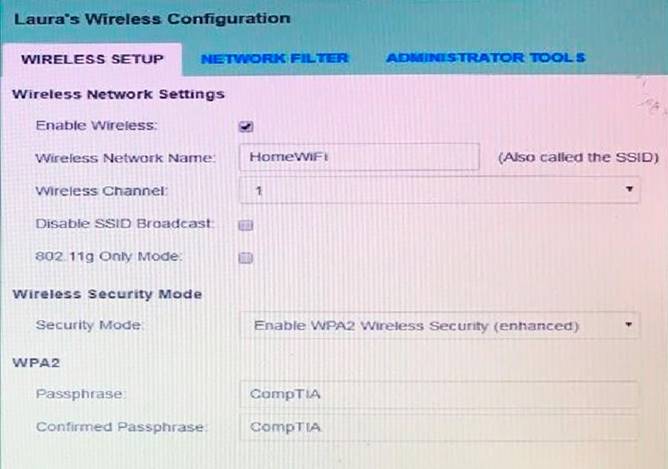
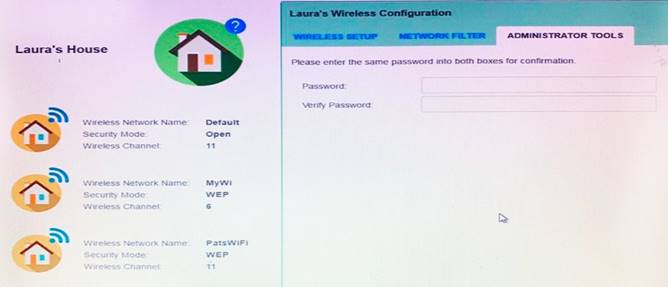
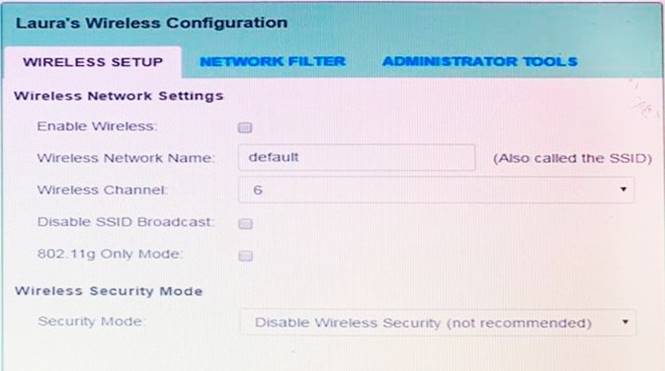
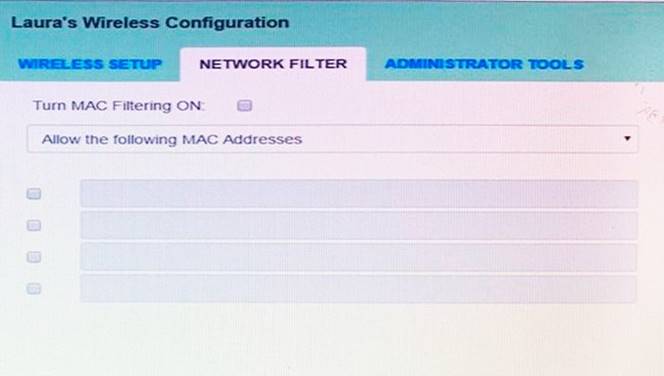
Solution:
solution as
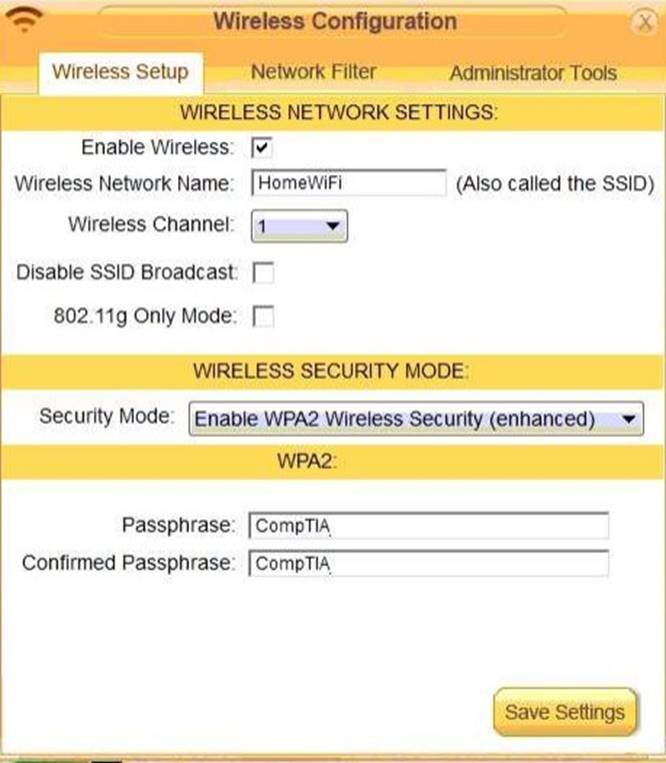
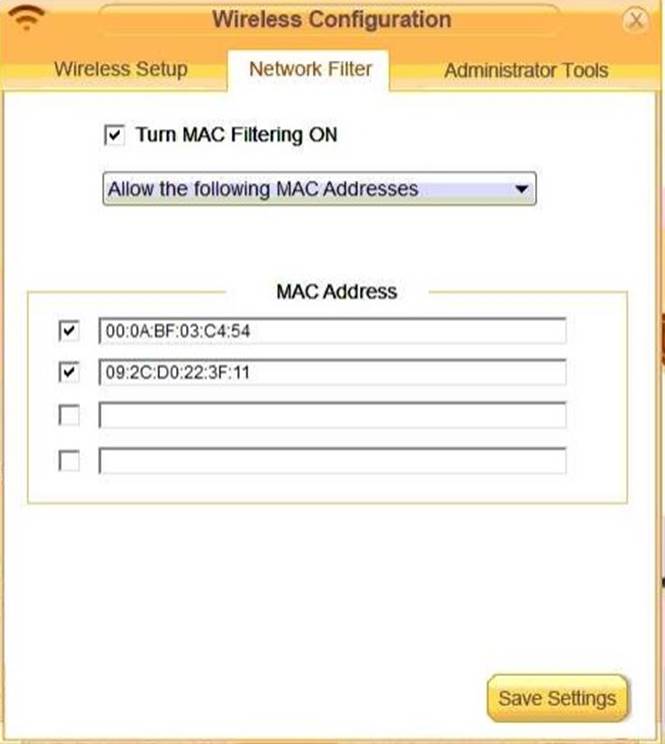
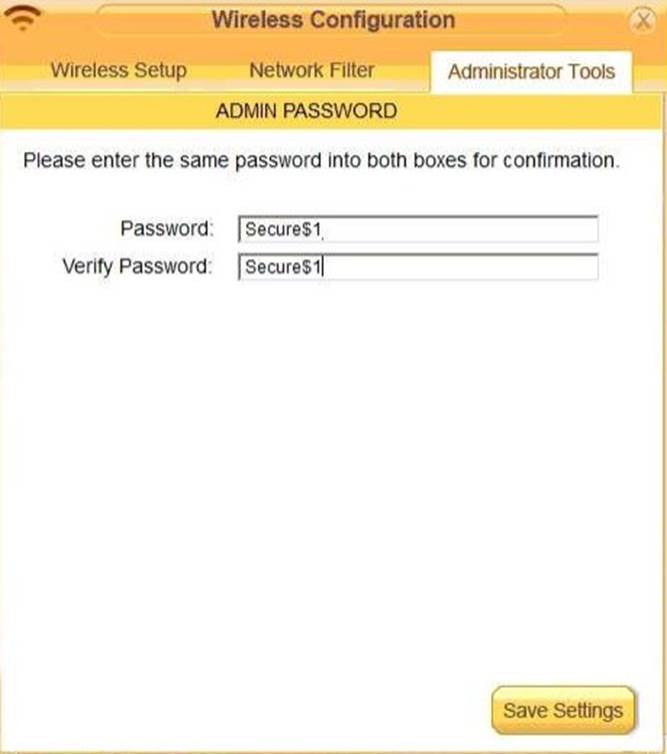
Does this meet the goal?
- A. Yes
- B. Not Mastered
Answer: A
NEW QUESTION 2
A technician is installing a storage solution for a computer that requires data redundancy with the fewest drives possible. Which of the following would best meet this requirement?
- A. RAID O
- B. RAID 1
- C. RAID 5
- D. RAID 10
Answer: B
NEW QUESTION 3
A desktop support technician receives an escalated ticket regarding a computer that displays the following message upon booting up: The amount of system memory has changed. Which of the following components is failing?
- A. GPU
- B. HDD
- C. RAM
- D. CPU
Answer: C
Explanation:
The message “The amount of system memory has changed” indicates that there is a problem with the random access memory (RAM) modules in the computer. The RAM may be loose, faulty, or incompatible with the motherboard or other components. The GPU, HDD, and CPU are not directly related to system memory and would not cause this message to appear.
NEW QUESTION 4
A technician is setting up a projector for a videoconferencing system. When the user attempts to connect a laptop to the system, the system displays the following error message:
no source found
The user tries multiple cables and inputs on the projector Which of the following should the user try next?
- A. Check the bulb the projector and replace it with a new one.
- B. Check the display settings on the computer and set them to extend/duplicate.
- C. Replace the projector another known-good one and try again.
- D. Replace the video card on the machine that is plugged in to tie projecto
- E. as it has gonebad.
Answer: B
Explanation:
The user should check the display settings on the computer and set them to extend/duplicate. This will allow the computer to send the video signal to both the laptop screen and the projector. If the display settings are set to only show on one screen, then the projector may not detect any source. According to the CompTIA Core1 objectives, one of the common display issues is no image on screen. A troubleshooting guide for projectors also suggests checking the display settings as a possible solution for no source found error.
NEW QUESTION 5
A home user has purchased a subscription for a service that blocks malicious sites by preventing them from resolving correctly. Which of the following settings MOST likely needs to be changed on the user's router to enable this functionally?
- A. DNS server
- B. Port forwarding
- C. Perimeter network
- D. Universal PnP
- E. DHCP server
Answer: A
Explanation:
The Domain Name System (DNS) is responsible for translating domain names into IP addresses. By blocking malicious sites from resolving correctly, the DNS server is able to prevent the user from accessing those sites. Therefore, the DNS server setting on the user’s router needs to be changed to enable this functionality123.
NEW QUESTION 6
To which of the following should a technician connect individual pairs of a Cat 6 cable in order to provide a connection to a switch?
- A. Access point
- B. Patch panel
- C. Hub
- D. Firewall
- E. Wall jack
Answer: B
Explanation:
A patch panel is a mounted hardware unit containing ports used to manage cable connections. The individual pairs of a Cat 6 cable are terminated on the patch panel, which then provides a central location for cable management and organization. The patch panel is then connected to the switch using a patch cable.
NEW QUESTION 7
A technician is troubleshooting a computer that is not completing POST and gets stuck at the manufacturer logo screen. All internal, removable parts have been disconnected and only the minimum parts necessary to POST were reconnected. However, the symptoms remain the same. Which of the following should the technician try NEXT?
- A. Test the RAM in different slots, one at a time.
- B. Remove and test the power supply.
- C. Replace the motherboard.
- D. Change the CMOS battery.
Answer: A
Explanation:
Every computer has a CMOS battery and when you remove that battery, your computer will work almost the same as before. The only difference is you won’t be able to save any settings in the BIOS, which includes the date and time. If your PC is not booting after removing CMOS, you need to make sure that you have your CPU and RAM connected because it’s not possible for your system to boot without those.. Your motherboard and computer will be able to boot just fine even without a CMOS battery present. The only issue is all your BIOS settings will be reset and the time and date will be inaccurate. You will also be unable to save BIOS settings.
NEW QUESTION 8
A technician is troubleshooting an old desktop system that randomly shows a Windows BSOD or powers off unexpectedly. All system temperatures are within normal limits. Which of the following should the technician do NEXT?
- A. Visually inspect the motherboard capacitors.
- B. Verify all case fans are operational.
- C. Check that the BIOS version supports the installed CPU.
- D. Compare the software requirements with the installed RAM.
Answer: A
Explanation:
BSoDs can be caused by poorly written device drivers or malfunctioning hardware, such as faulty memory, power supply issues, overheating of components, or hardware running beyond its specification limits. In the Windows 9x era, incompatible DLLs or bugs in the operating system kernel could also cause BSoDs.
NEW QUESTION 9
Which of the following internet connection types would be the most readily available for users located on unimproved land that lacks infrastructure?
- A. Fiber
- B. Cable
- C. DSL
- D. Satellite
Answer: D
Explanation:
Satellite internet is the most widely available internet connection type, as it does not depend on cables or wires. It can reach remote areas that lack infrastructure for other types of internet connections1. References: Satellite Internet
NEW QUESTION 10
A user reports that when pressing a radio button on a tablet, an item a couple of inches to the right of the pressed button gets selected instead. Which of the following components may need to be replaced?
- A. Gyroscope
- B. Battery
- C. Digitizer
- D. Glass
Answer: C
Explanation:
A digitizer is a component that converts the touch input on a tablet screen into digital signals that can be processed by the device. A digitizer consists of a thin layer of transparent material that covers the glass screen and has sensors that detect the position and pressure of the touch. If the digitizer is damaged, misaligned, or poorly calibrated, it can cause inaccurate touch input, such as selecting the wrong item or not responding at all12. Therefore, the most likely cause of the issue in this scenario is a faulty digitizer that may need to be replaced. The other components are not directly related to the touch input functionality of the tablet. A gyroscope is a sensor that measures the orientation and rotation of the device3. A battery is a power source that supplies electricity to the device4. A glass is a protective layer that covers the screen and prevents scratches and cracks5. References
1: What is a Digitizer? - Definition from Techopedia
2: How to Fix a Broken Digitizer on a Tablet | Chron.com
3: What is a Gyroscope Sensor in Mobile Phones? - Definition from Techopedia 4: What is a Battery? - Definition from Techopedia
5: What is Glass? - Definition from Techopedia
NEW QUESTION 11
A technician responds to a user who has reported that a laptop is too hot. The technician notices the laptop is not able to sit level on the workspace. What of the following BEST describes the issue with the laptop?
- A. The docking station is improperly installed.
- B. The hard drive is disconnected.
- C. The CPU fan is too powerful.
- D. The battery is damaged.
Answer: D
Explanation:
A damaged battery can cause a laptop to overheat and swell, making it unable to sit level on the workspace. A swollen battery can also pose a fire hazard and damage other components of the laptop, such as the motherboard or keyboard. The technician should replace the battery as soon as possible and dispose of it properly according to local regulations. Reference: https://partners.comptia.org/docs/default- source/resources/a-core-series-combined-content-guide (page 25)
NEW QUESTION 12
A user reports a monitor, keyboard, mouse. and headset are no longer functioning. The user has restarted the laptop and tested an alternative headset and monitor, but the issue persists. The technician notices the user has a printer. USB-C hub, and AC adapter plugged into the laptop. Which of the following should the technician do to MOST likely resolve the issue?
- A. Verify the AC adaptor voltage.
- B. Repair the operating system.
- C. Replace the user’s USB-C hub.
- D. Reinstall the drivers for affected devices.
- E. Make sure the printer is not drawing too much power.
Answer: C
Explanation:
The most likely cause of the issue is that the user’s USB-C hub is faulty or incompatible with the laptop. The USB-C hub is a device that allows the user to connect multiple peripherals to the laptop using a single USB-C port. If the hub is not working properly, it may prevent the monitor, keyboard, mouse, and headset from functioning. The technician should replace the user’s USB-C hub with a new one that is compatible with the laptop and test the peripherals again. Verifying the AC adapter voltage will not help with the issue, as the AC adapter is used to power the laptop, not the peripherals. Repairing the operating system will not help either, as the issue is not related to software. Reinstalling the drivers for affected devices may not help, as the issue may be caused by the hub, not the devices. Making sure the printer is not drawing too much power is irrelevant, as the printer is not connected to the hub or affecting the other peripherals. References: https://www.comptia.org/blog/what-is-usb-c
NEW QUESTION 13
Which of the following utilizes TCP ports 20/21 and transfers data in cleartext?
- A. SNMP
- B. SSH
- C. FTP
- D. Telnet
Answer: C
Explanation:
FTP (File Transfer Protocol) uses TCP ports 20/21 and transfers data in cleartext, which means the data is not encrypted and can be read by anyone who intercepts it. This makes FTP insecure for transferring sensitive information. SSH (Secure Shell), on the other hand, uses port 22 and encrypts data, making it more secure. SNMP (Simple Network Management Protocol) uses ports 161/162 and is used to monitor network devices. Telnet uses port 23 and transfers data in cleartext, making it insecure. References: CompTIA A+ Certification Exam: Core 1 - Page 199
NEW QUESTION 14
A user calls the help desk lot assistance configuring an Android phone with a new NFC-enabled speaker that will be used for an upcoming conference call. The user was unable to direct the phone's audio to the NFC speaker. Which of the following sequences should the help desk technician walk the customer through to accomplish this task?
- A. Enable NFC on the speake
- B. Ensure the speaker is less than 33ft (10m) from the Android phon
- C. On the phone's Bluetooth settings menu for Connected Devices, select Pair New Devic
- D. Tap to accept the connection to the speaker when the prompt is displayed on the phone's screen.
- E. Enable NFC and Bluetooth on the Android phon
- F. From the Android phone's Bluetooth settings menu for Connected Devices, select the Previously Connected Devices optio
- G. Select a listed device that most closely matches the speake
- H. Tap lo accept the connection lo the speaker when the prompt is displayed on the phone's screen.
- I. Enable NFC and Bluetooth on the Android phon
- J. Tap and hold the Android phone to the spot on the speaker where the NFC logo is displaye
- K. Accept the connection to the speaker when the prompt is displayed on the phone's screen.
- L. Enable Wi-Fi on the speake
- M. Enable Wi-Fi on the Android phon
- N. Tap and hold the Android phone to the spot on the speaker where the NFC logo is displaye
- O. Accept the connection to the speaker when the prompt is displayed on the phone's screen.
Answer: A
NEW QUESTION 15
While implementing a non-carrier-grade wireless backhaul, a technician notices the current channel selection is externally polluted with various RF signals. Upon performing a spectral analysis, the technician discovers a channel containing almost no RF pollution. Unfortunately, the technician is unable to select that channel. Which of the following is the MOST likely reason for this issue?
- A. The channel is reserved for licensed band use.
- B. The channel selection is defective, contact the manufacturer.
- C. The channel must be unblocked by the vendor.
- D. The device requires a firmware update to unlock the channel.
Answer: A
Explanation:
The 2. band is subdivided into up to 14 channels, spaced at 5 MHz intervals from 2412 MHz up to 2484 MHz. Wi-Fi requires bandwidth of approximately 20 MHz, not 5 MHz. Consequently, a site designer needs to choose the channels that do not overlap. On a WLAN where only the first 11 channels are available, channels 1, 6, and 11 can be selected as non-overlapping. Note: In the Americas, regulations permit the use of channels 1-11 only, while in Europe, channels 1-13 are permitted. In Japan, all 14 channels are permitted.
NEW QUESTION 16
Which of the following describes the BEST use case for a client-side hypervisor?
- A. By For a software developer who is required to test an application in many environments
- B. When the data center environment is out of resources for a new server
- C. As a cost-saving measure to allow multiple users on one computer
- D. To provide a backup to cloud-based solutions during internet failures
Answer: A
Explanation:
A client-side hypervisor is a virtual machine monitor (VMM) that resides in and virtualizes a user’s computer, allowing it to run multiple operating systems (or virtual machines) on shared hardware12. A client-side hypervisor can be useful for a software developer who needs to test an application in many environments, such as different versions of Windows, Linux, or Mac OS. By using a client-side hypervisor, the developer can switch between different virtual machines without rebooting the computer or using multiple physical devices3.
NEW QUESTION 17
......
Recommend!! Get the Full 220-1101 dumps in VCE and PDF From Surepassexam, Welcome to Download: https://www.surepassexam.com/220-1101-exam-dumps.html (New 804 Q&As Version)